
.avif)
Picture going into a digital store where you don't need to ask a salesman because all the information you need is available to you, including details, prices, and products. It sounds good, doesn't it?
So how does that actually happen?
Thanks to WhatsApp Automation. With message open rates of 98% and above, WhatsApp has emerged as one of the most reliable platforms for e-commerce companies. It lets you have direct, distraction-free conversations with your consumers and even present your products in chat, much like a little online store.
However, you must build a WhatsApp Catalog in order for this to function. Furthermore, although it could seem simple, properly putting it up requires some consideration.
This guide is provided precisely for that reason to walk you through how to make catalogue in WhatsApp, discuss why it's so effective, and demonstrate how you can use it to increase sales and differentiate your brand in 2026.
Let’s get started!
Setting up your brand’s catalog is actually quite simple and takes just a few minutes.
Before that, one quick but crucial question to ask before you begin: are you using the ordinary WhatsApp app or the WhatsApp Business app? It may seem obvious, but if you want to establish and maintain a product catalog, you must have the WhatsApp Business app.
If you have a WhatsApp business account, take the actions listed below:
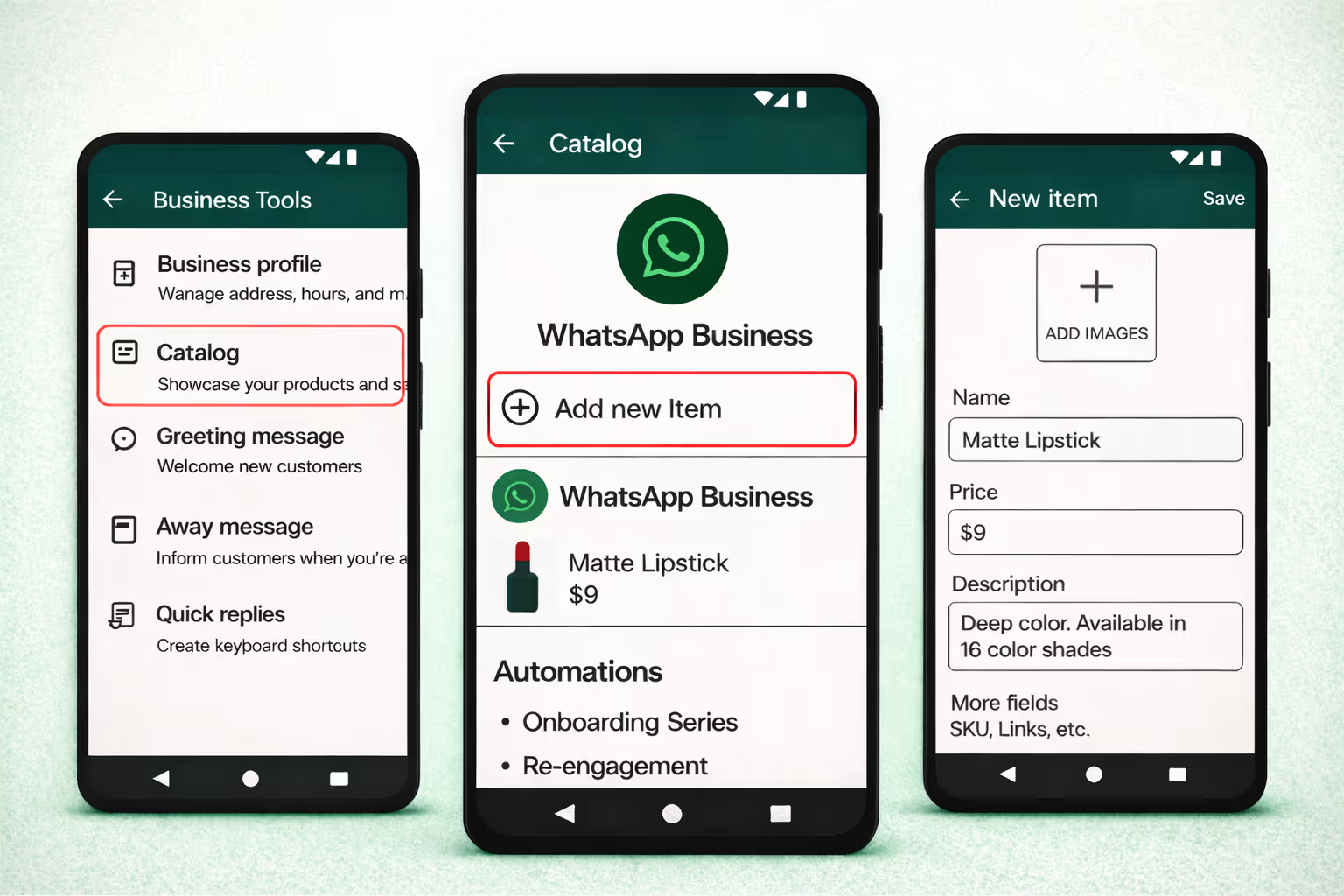
1. Open WhatsApp Business and tap the three dots in the top-right corner.
From the menu, select Business tools, then tap on Catalog.
2. Inside the Catalog section, tap “Add new item.”
3. Now start adding your product details:
4. If you have multiple product variations, tap on the optional fields to add details like SKU, color, size, or any other relevant information.
5. Once everything looks good, tap Save and review the details carefully.
After approval, your catalog item will be visible to customers. This usually takes up to 24 hours.
Making a WhatsApp catalog is simple, but the hard part is getting your clients to find it interesting and engaging. Many companies suffer because they are unsure of what they are doing incorrectly.
Let's look at key practices to maximize your catalog's performance.
Things to consider when making a catalog
Things Not to Do:
Now you know how to make catalogue in WhatsApp, but how will your clients find it and use it to make purchases? You must incorporate your catalog into your sales plan in order to do this. This will concurrently increase your conversion rate, customer retention, and engagement.
Here's how to do it successfully:
1. Feature in Campaigns: To keep your customers informed, you can easily display your seasonal collection or new arrivals in the catalog. For instance, "Hi Riya, have you seen our newest line of Mom Fit Jeans? Find your ideal fit right now by browsing the catalog.”
2. Attach Payment Links: You can offer direct payment methods so that customers can make purchases right away without having to wait for messages like “Hi Ananya 🌸, our Vitamin C Serum is back in stock! Order directly from the catalogue and pay instantly with this link 💳: [Payment Link].”
3. Promote Limited-Time Offers: Sending a sales catalog with special offers can increase the urgency of the goods and encourage quicker purchases. Messages such as “Hey Rahul 🎧, don’t miss our 48-hour flash sale on wireless earphones! Browse the catalogue now and grab your deal before it’s gone!”
4. Recover Abandoned Carts: Let's say you work in the footwear business and a customer leaves a product in their cart just thirty minutes prior. With a message like "Hello Aarav, we noticed you left some sports shoes in your cart," you can win that consumer over. This catalog contains similar styles that you might find appealing. Finish your order right now!”
5. Segment and Personalize: You can add catalogs with split customer lists to share customized products that only display pertinent items. Messages saying "Hello Sneha, our Winter Collection is here! Check the catalogue for cozy jackets and sweaters picked just for you. Stay warm and stylish this season!”
Developing and spreading your WhatsApp collection expands consumer reach, improves engagement, and boosts return on investment. Convertway does this like magic, making the process far simpler than you could have ever thought.
You can do much more with Convertway than just make a catalog. You can use automation to connect, synchronize, and sell directly over WhatsApp.
Important Convertway Features:
To put it briefly, Convertway turns your WhatsApp inventory into an effective marketing tool. Without requiring users to exit the chat, it enables you to link items, automate messages, customize shopping experiences, and increase sales all within WhatsApp, and remove all of your doubts, like how to make catalogue in WhatsApp.
FAQs:
1. How do I create a catalogue on WhatsApp?
The WhatsApp Business app is required in order to establish a catalogue:
2. How to rearrange WhatsApp catalog?
You can rearrange your catalogue items using WhatsApp:
3. How does WhatsApp catalogue work?
A WhatsApp catalogue works like a small online store inside the app. Customers can see product images, prices, and details directly in the chat. They can ask questions, get more information, and place orders without leaving WhatsApp. When used with automation tools, the catalogue can be shared automatically, personalized for customers, and used for sales follow-ups.
4. How to create a WhatsApp shopping cart?
Although WhatsApp doesn't offer a complete shopping cart as websites do, you can mimic one:
5. How do I share my online catalog?
You can share your WhatsApp catalogue directly from the Catalogue section by sending it in a chat, broadcast, or group. The catalogue link can also be shared during campaigns or customer conversations.
6. What apps can I use to create a catalogue?
The WhatsApp Business app can be used for basic catalogue creation; the Meta Business Suite helps manage and sync larger catalogues; and Convertway enables automated catalogue sharing, Shopify integration, payment links, abandoned cart recovery, and analytics tracking, all in one platform.